
This is a collaborative group project aimed at developing an Android app for comparing job offers when job hunting. It allows users to input various data from offers, such as salary, working hours, distance to the workplace, etc., and customize weight values to evaluate the quality of the job offers.
Activity 1: Define Requirements and Create UML Diagrams
Activity 2: Set Up Project Management Tools and Development Environment
Activity 3: Design Wireframes and Mockups
Activity 4: Implement Main Menu and Navigation
Activity 5: Develop Forms for Entering Job Details and Job Offers
Activity 6: Implement Data Models and Business Logic
Activity 7: Integrate Front-end and Back-end Components
Activity 8: Perform Unit Testing and Bug Fixing
Activity 9: Conduct Usability Testing
Activity 10: Make Final Adjustments
For the software lifecycle model, the team took a waterfall model approach since the user requirements are well defined and unlikely to change. We tackled the aforementioned activities in order, ensuring each exit criteria is successful and validated by other team members before moving onto the next one.
For code collaboration on the team repository, the team adopted the [Git feature branch workflow](Git Feature Branch Workflow _ Atlassian Git Tutorial), which allowed for prototyping flexibility and faster development.
To ensure code in the main branch is stable, we tag successful versions of the repository after each milestone, e.g. after submitting a deliverable.
These are the main roles in the team:
| Role | Description |
|---|---|
| Project Manager | Oversees project planning, scheduling, execution, and project submission. |
| App Developer | Responsible for developing of the front-end UI and back-end logic of the app. |
| Database Developer | Responsible for ensuring data persists between runs. |
| UI/UX Designer | Designs the app’s interface and user experience. |
| Quality Assurance | Ensures the app meets user requirements and is bug-free. |
The app development work was split by Acitivities and Models in the team. Above that, each member of the team took on an additional role to ensure project success.
| Team Member | Roles |
|---|---|
| Tuck Weng Pung | Project Manager & App Developer |
| Christian Duque | Database Developer & App Developer |
| Viktoryia Kalamiyets | UI/UX Designer & App Developer |
| Zixiong Wan | Quality Assurance & App Developer |
When the app is started, the user is presented with the main menu, which allows the user to (1) enter or edit current job details, (2) enter job offers, (3) adjust the comparison settings, or (4) compare job offers (disabled if no job offers were entered yet).
Client Requirement 1
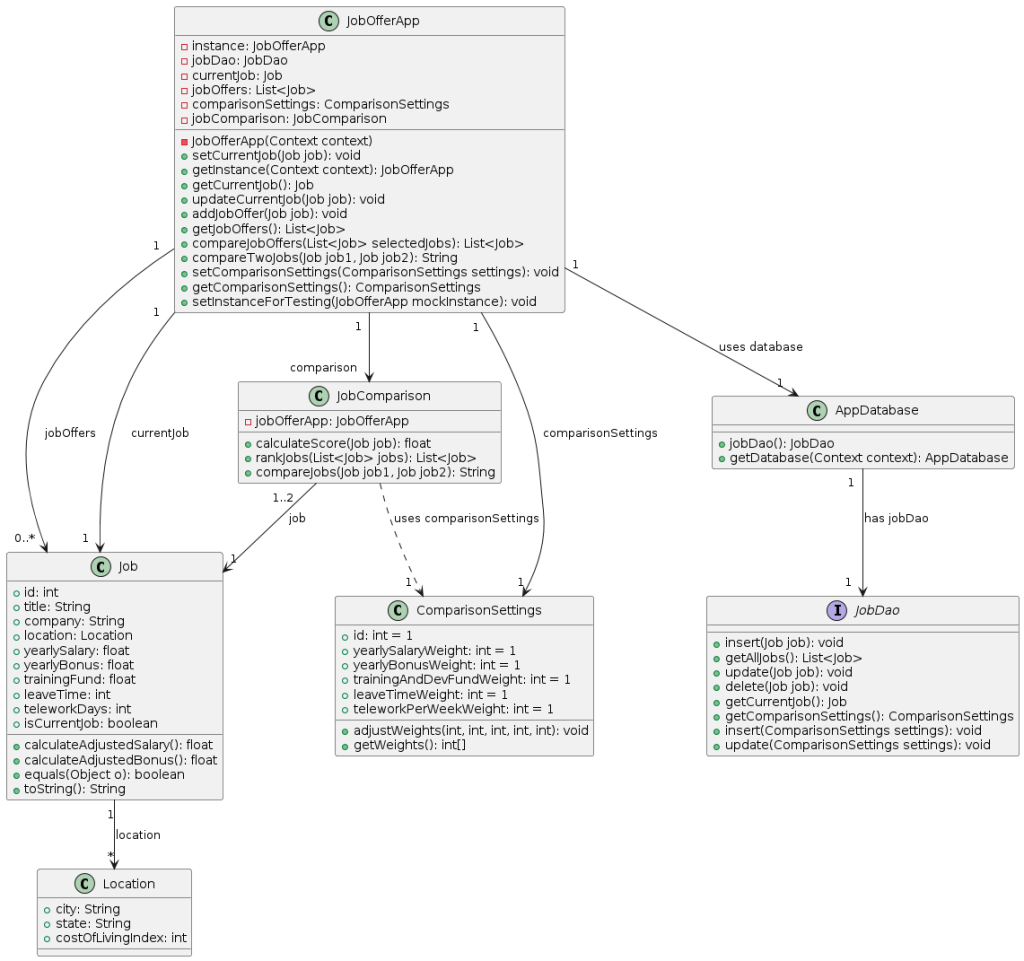
To fullfill this requirement, we created the JobOfferApp class which has:
mainMenu method to choose between the different actionsenterCurrentJobDetails method to enter current job details. The currentJob attribute is used to store the current job details.enterJobOfferDetails method to enter job offers. The jobOffers attribute is a list of Job objects, enabling the storage of multiple job offers.comparisonSettings attribute, which has default values of 1, and the adjustComparisonSettings method for adjusting weights.comparison attribute and compareJobOffers method to compare and rank the jobs.When choosing to enter current job details, a user will: a. Be shown a user interface to enter (if it is the first time) or edit all the details of their current job, which consists of: i. Title ii. Company iii. Location (entered as city and state) iv. Cost of living in the location (expressed as an index) v. Yearly salary vi. Yearly bonus vii. Training and Development Fund viii. Leave Time ix. Telework Days per Week
Client Requirement 2
To fulfill this requirement, the method enterCurrentJobDetails will be invoked. We also created the Job class with the relevant attributes. Most details can be directly added as attributes of the Job class, with one exception. A Location has some attributes associated with it, namely its city, state, and cost of living. To reduce repetition of data if we were to store it as part of a Job attribute, we chose to model the Location as a separate class, and the Job has an associated Location.
Be able to either save the job details or cancel and exit without saving, returning in both cases to the main menu.
Client Requiremen 2.b
When the user presses the save button, a new Job instance will be created and set as the currentJob attribute of the JobOfferApp. If the user presses the cancel button, the new job instance will not be created. In both cases, the mainMenu method will be invoked.
When choosing to enter job offers, a user will: a. Be shown a user interface to enter all the details of the offer, which are the same ones listed above for the current job.
Client Requirement 3
To realize this requirement, the method enterJobOfferDetails will be invoked. We use the same class Job as for the method enterCurrentJobDetails.
Be able to either save the job offer details or cancel.
Client Requirement 3.b
When the user presses the save button, a new Job instance will be created and added to jobOffers list. If the user presses the cancel button, the new job instance will not be created. In both cases, the mainMenu method will be invoked.
Be able to (1) enter another offer, (2) return to the main menu, or (3) compare the offer (if they saved it) with the current job details (if present).
Client Requirement 3.c
jobOffers was created in the JobOfferApp.mainMenu will be invoked and the user will be redirected to the main menu.JobComparison class is presented.When adjusting the comparison settings, the user can assign integer weights to: a. Yearly salary b. Yearly bonus c. Training and Development Fund d. Leave Time e. Telework Days per Week. If no weights are assigned, all factors are considered equal.
Client Requirement 4
To fulfill this requirement, we created the ComparisonSettings class with the corresponding attributes with values equal to 1 by default. The JobOfferApp class includes an adjustComparisonSettings method for adjusting these weights.
When choosing to compare job offers, a user will: a) Be shown a list of job offers, displayed as Title and Company, ranked from best to worst (see below for details), and including the current job (if present), clearly indicated.
Client Requirement 5
The JobOfferApp class includes a compareJobOffers method for this purpose. The JobComparison class contains the method getRankedJobs to display the ranked jobs.
To indicate which of these jobs is the current job, the JobOfferApp has a currentJob attribute. The computeScore method implements the formula for ranking job offers.
Select two jobs to compare and trigger the comparison. Be offered to perform another comparison or go back to the main menu.
Client Requirement 5.b
Upon selecting two jobs to compare, the method compareJobs will be invoked, using selected jobs as parameters for this method. If the user chooses another comparison, the steps will be repeated. Otherwise, the method mainMenu will be called
When ranking jobs, a job’s score is computed as the weighted average of: AYS + AYB + TDF + (LT * AYS / 260) - ((260 - 52 * RWT) * (AYS / 260) / 8)) where: AYS = Yearly Salary Adjusted for cost of living AYB = Yearly Bonus Adjusted for cost of living TDF = Training and Development Fund ($0 to $18000 inclusive annually) LT = Leave Time (0-100 whole number days inclusive) RWT = Telework Days per Week
Client Requirement 5.b
To realize this requirement the method computeScore in the class JobComparison is created. Reference
Enter current job details buttonsave buttonmain menuEnter current job details buttonsave buttonsave buttonmain menuEnter current job details buttonsave buttoncompare the user is shown a comparative table of the two selected jobs.Enter job offers buttonsave buttonenter another offer, compare the offer with the current job details, return to main menureturn to main menuEnter job offers buttonsave buttonenter another offer, compare the offer with the current job details, return to main menuenter another offerreturn to main menuEnter job offers buttonsave buttoncompare buttonreturn to main menucompare buttonmake another comparisonreturn to main menucompare buttonadjust comparison settingsadjust comparison settingsstring instead of integer weights to the chosen fieldsinteger weights to the chosen fieldsadjust comparison settings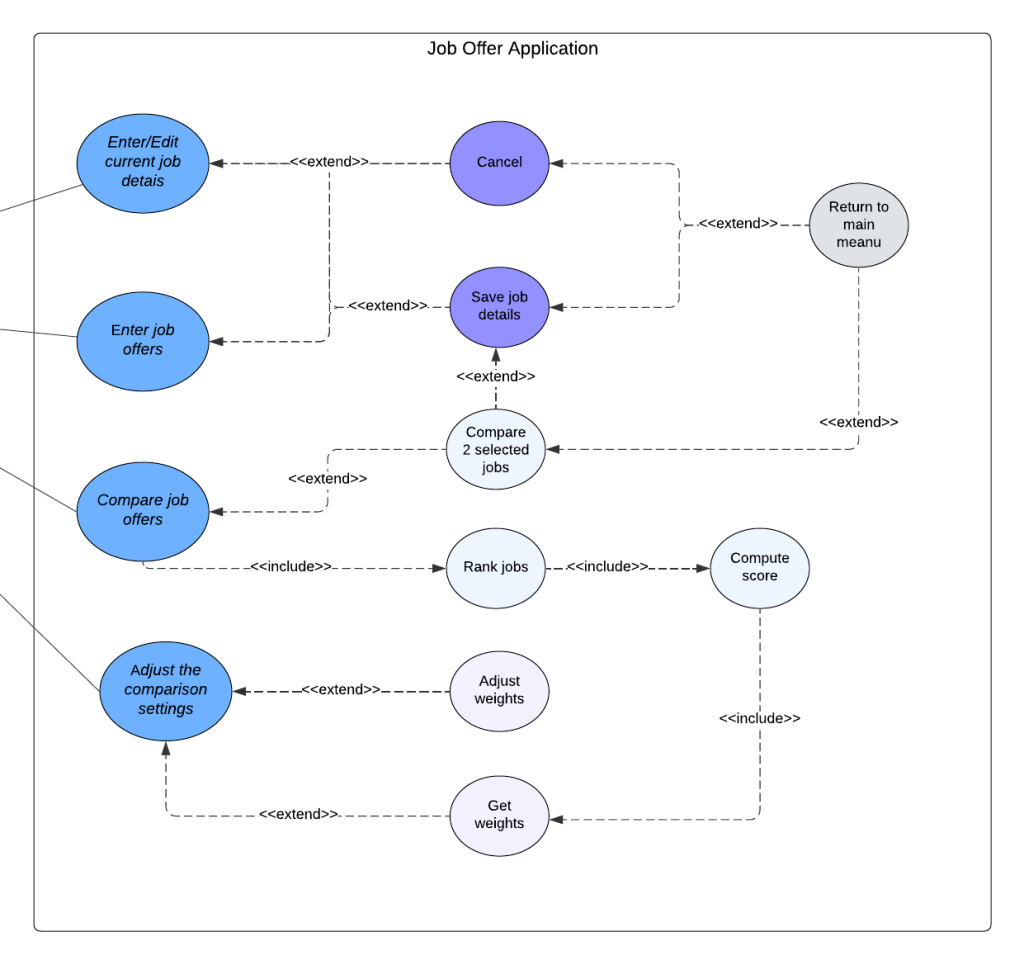
The testing strategy for the Job Offer Comparison application will include unit testing, integration testing, system testing, and regression testing. The testing activities will be performed as follows: Unit Testing: Conducted by developers who is responsible for building this part, to test methods in each individual component
compareJob , getRankedjobs(), computeScorein class JobComparisonadjustWeights(), getWeight()in class ComparisonSettingsMainmenu(),enterCurrentjobDetails(), enterjobOfferDetails(), adjustCompaisonSettings(), comparejobOffers() in Class jobOfferAppIntegration Testing: Conducted by the whole team to ensure that different components/modules work together as expected
JobOfferApp and Job:JobOfferApp can correctly assign a Job to with currentJob.JobOfferApp and ComparisonSettingsJobOfferApp can correctly assign ComparisonSettings.JobOfferApp and JobComparisonJobOfferApp can correctly initiate a JobComparisonJob and LocationJobComparison and JobJobComparison and ComparisonSettingsJobComparison correctly uses ComparisonSettings to adjust comparison weights.System Testing: Conducted by the whole team to validate the end-to-end functionality of the application against the requirements to see if the the various features work.
Regression Testing: Conducted by whole team to ensure that new code changes do not adversely affect the existing functionality of the application. To make this test, select a subset of test cases from unit, integration, and system testing that cover critical functionalities and areas affected by recent changes. Automate the execution of selected test cases using testing tools to ensure quick and consistent validation.
Test cases will be selected using a combination of black-box and white-box testing technique.
Black-box Testing: Focuses on the functionality of the application without considering the internal code structure. This will be used primarily for system testing. In our project, we use a Category Partition Method:
White-box Testing: Focuses on the internal logic and structure of the code. This will be used for unit testing and integration testing to ensure all paths and branches are tested. Use Control-flow based testing shown in P4L3 involves creating test cases to cover different paths in the code, including all branches and conditions.
Adequacy criteria are metrics used to evaluate the completeness and effectiveness of the test cases in covering the functionality and structure of the application.
Bugs and enhancement requests were tracked using a bug tracking system (e.g., JIRA). Each bug was logged with details such as steps to reproduce, severity, priority, and assigned developer. The status of each bug are updated as it progresses through different stages.
The following testing technologies are used:

This is a Navigator for my CS Practice.
zixiongwan@gmail.com