
This project was developed for a research topic at Tokyo Tech’s Yasuda Laboratory. It involves visualizing indoor thermal environment data of buildings using Seaborn, sklearn, and pandas, and conducting Random Forest Classification on various factors to identify the main factors affecting the indoor thermal environment.
Data Source: Official Github
					ieq_data = pd.read_csv("ashrae_thermal_comfort_database_2.csv", index_col='Unnamed: 0')
ieq_data.info()
ieq_data["ThermalSensation_rounded"].value_counts()
feature_columns = [
 'Year',
 'Season',
 'Climate',
 'City',
 'Country',
 'Building type',
 'Cooling startegy_building level',
 'Sex',
 'Clo',
 'Met',
 'Air temperature (C)',
 'Relative humidity (%)',
 'Air velocity (m/s)']
 features = ieq_data[feature_columns]
 features.info()
 target = ieq_data['ThermalSensation_rounded']
					features_withdummies = pd.get_dummies(features)
features_withdummies.head()
features_train, features_test, target_train, target_test = train_test_split(features_withdummies, target, test_size=0.3, random_state=2)
model_rf = RandomForestClassifier(oob_score = True, max_features = 'auto', n_estimators = 100, min_samples_leaf = 2, random_state = 0)
model_rf.fit(features_train, target_train)
					#Dummy Classifier model to get a baseline
baseline_rf = DummyClassifier(strategy='stratified',random_state=0)
baseline_rf.fit(features_train, target_train)

baseline_model_accuracy = baseline_rf.score(features_test, target_test)
print("base accuracy: "+str(baseline_model_accuracy))
| Year | Clo | Met | Air temperature (C) | Relative humidity (%) | Air velocity (m/s) | Season_Autumn | Season_Spring | Season_Summer | Season_Winter | ||||||||||||
|---|---|---|---|---|---|---|---|---|---|---|---|---|---|---|---|---|---|---|---|---|---|
| 2012 | 0.75 | 1 | 25.2 | 64 | 0.1 | 0 | 0 | 0 | 1 | ||||||||||||
| 2012 | 0.64 | 1 | 25.2 | 64 | 0.1 | 0 | 0 | 0 | 1 | ||||||||||||
| 2012 | 0.64 | 1 | 25.2 | 64 | 0.1 | 0 | 0 | 0 | 1 | ||||||||||||
| 2012 | 0.75 | 1 | 25.2 | 64 | 0.1 | 0 | 0 | 0 | 1 | ||||||||||||
| 2012 | 0.72 | 1 | 25.2 | 64 | 0.1 | 0 | 0 | 0 | 1 |
precision, recall, f1-score, and support metrics for each of the classes being predicted.
					y_pred = model_rf.predict(features_test)
y_true = np.array(target_test)
categories = np.array(target.sort_values().unique())
print(classification_report(y_true, y_pred))
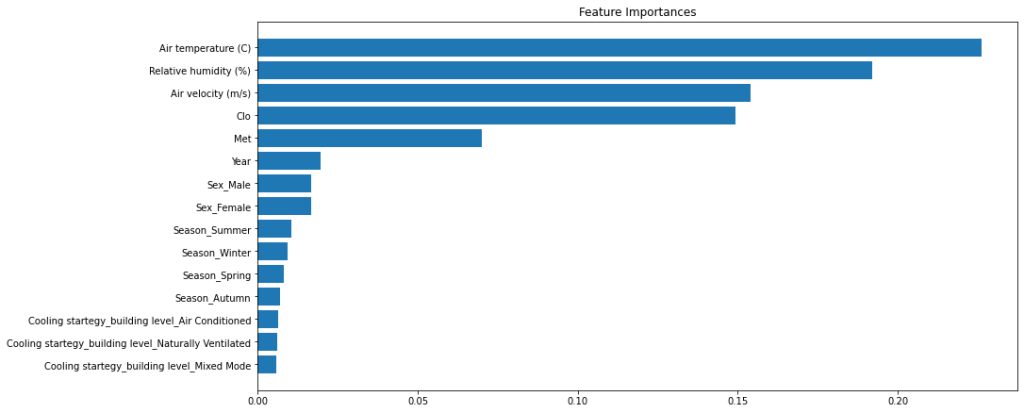
					importances = model_rf.feature_importances_
std = np.std([tree.feature_importances_ for tree in model_rf.estimators_], axis=0)
indices = np.argsort(importances)[::-1]
# Print the feature ranking
print("Feature ranking:")
for f in range(10):
    print(f + 1, features_withdummies.columns[indices[f]], importances[indices[f]])
| Rank | Feature | Importance |
|---|---|---|
| 1 | Air temperature (C) | 0.2261 |
| 2 | Relative humidity (%) | 0.1920 |
| 3 | Air velocity (m/s) | 0.1540 |
| 4 | Clo | 0.1494 |
| 5 | Met | 0.0700 |
| 6 | Year | 0.0195 |
| 7 | Sex_Male | 0.0167 |
| 8 | Sex_Female | 0.0166 |
| 9 | Season_Summer | 0.0106 |
| 10 | Season_Winter | 0.0094 |
					# Plot the feature importances of the forest
plt.figure(figsize=(15,6))
plt.title("Feature Importances")
plt.barh(range(15), importances[indices][:15], align="center")
plt.yticks(range(15), features_withdummies.columns[indices][:15])#
plt.gca().invert_yaxis()
plt.tight_layout(pad=0.4)
plt.show()

This is a Navigator for my CS Practice.
zixiongwan@gmail.com