
This project is to implement a multi-threaded server that serves static files using a simple HTTP-like protocol called “GetFile.” And also to create a multi-threaded client that acts as a load generator for the server. Below are the detailed steps for completing the project.
echoserver and echoclient that implement basic echo functionality.char buffer[16];).getaddrinfo , which stores all addresses that meet the criteria in the res structure based on the hostname, port, and filtering rules.res and make socket , attempting to connect to the retrieved addresses. If successful, it continues; if not, it tries the next one, ultimately connecting to the server.
					#include <sys/socket.h>
    struct addrinfo hints, *res, *p;
    int sockfd, status;
    char port_str[10];

    snprintf(port_str, sizeof(port_str), "%d", portno);
    memset(&hints, 0, sizeof hints);

    //accept both ipv4 and ipv6
    hints.ai_family = AF_UNSPEC;
    hints.ai_socktype = SOCK_STREAM;

    //get address info
    status = getaddrinfo(hostname, port_str, &hints, &res);
    if(status != 0) {
        printf("Could not get address info\n");
        exit(1);
    }

    // make socket
    for (p = res; p != NULL; p = p->ai_next){
        sockfd = socket(p->ai_family, p->ai_socktype, p->ai_protocol);
        if (sockfd == -1){
            perror("socket");
            continue;
        }
        // connect to the server address
        if (connect(sockfd, p->ai_addr, p->ai_addrlen) == -1) {
            perror("connect");
            close(sockfd);
            continue;
        }
        break;
    }
    if (p == NULL){
        fprintf(stderr, "failed to connect\n");
        exit(1);
    }
    freeaddrinfo(res);
socket and waits for a response from the server.buffer is established to read the message received from the server. If the received message does not match the sent message, an error is reported.
					// send message
    int n = write(sockfd, message, strlen(message));
    if (n < 0){
        printf("\nCould not write to socket\n");
        exit(1);
    }

    // wait for the serve to response and check the message
    char buffer[BUFSIZE];
    memset(buffer, 0, BUFSIZE);
    ssize_t num_bytes = read(sockfd, buffer, sizeof buffer - 1);
    if (num_bytes < 0){
        printf("\nCould not read from socket\n");
        exit(1);
    }else if (num_bytes == 0) {
        fprintf(stderr, "Server closed connection\n");
        exit(1);
    }
    buffer[num_bytes] = '\0';

    if (strcmp(message, buffer) == 0) {
        fprintf(stdout, "%s", buffer);
    } else {
        fprintf(stderr, "%s", buffer);
    }

    close(sockfd);
    return 0;
					// Setup address struct
    memset(&servaddr_ipv6, 0, sizeof(servaddr_ipv6));
    servaddr_ipv6.sin6_family = AF_INET6;
    servaddr_ipv6.sin6_addr = in6addr_any; // support both Ipv4 and Ipv6
    servaddr_ipv6.sin6_port = htons(portno);

    // Bind socket to the address
    if (bind(listenfd_ipv6, (struct sockaddr *)&servaddr_ipv6, sizeof(servaddr_ipv6)) == -1) {
        perror("IPv6 bind");
        close(listenfd_ipv6);
        exit(5);
    }

    // Start listening
    if (listen(listenfd_ipv6, maxnpending) == -1) {
        perror("IPv6 listen");
        close(listenfd_ipv6);
        exit(6);
    }
    printf("Server listening on IPv6 address and port %d\n", portno);
					// Wait for connection
    while (1) {
        struct sockaddr_storage clientaddr;
        socklen_t clientaddrlen = sizeof(clientaddr);
        char buffer[BUFSIZE];
        memset(buffer, 0, sizeof(buffer));
        // Accept connections
        int clientfd_ipv6 = accept(listenfd_ipv6, (struct sockaddr *)&clientaddr, &clientaddrlen);
        if (clientfd_ipv6 < 0) {
            perror("accept failed");
            close(clientfd_ipv6);
            continue;
        }
        // Receive from client
        int n = recv(clientfd_ipv6, buffer, sizeof(buffer), 0);
        if (n < 0) {
            perror("recv failed");
            close(clientfd_ipv6);
            continue;
        }
        // Echo message to client
        n = send(clientfd_ipv6, buffer, n, 0);
        if (n < 0) {
            perror("send failed");
            close(clientfd_ipv6);
            continue;
        }
        close(clientfd_ipv6);
    }
    close(listenfd_ipv6);
    return 0;
It is http-like protocol to transfer files between client and server. The key is to define the Protocol and send header according to situation:
<scheme> <method> <path>\r\n\r\n<scheme> <status> <length>\r\n\r\n<content>OK, FILE_NOT_FOUND, ERROR, and INVALID.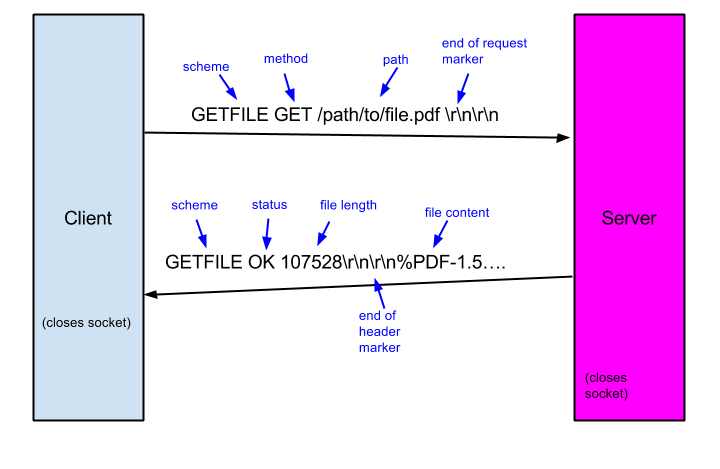
To enhance clarity and encapsulation, the common code for the client and server is encapsulated in the libraries gfclient.[ch] and gfserver.[ch].
Establish a connection with the server and open the specified file in write mode, waiting for the server to send the file.
Create a buffer to receive the file data. To ensure all content is received, use a loop that continues as long as recv is still receiving data.
Write the received data to the file. To confirm that all data is written, implement another loop that runs as long as the bytes_written is less than bytes_received.
When recv no longer has new data, close both the file and the socket.
					  /*Making the requests...*/
  for (int i = 0; i < nrequests; i++) {
    req_path = workload_get_path();

    if (strlen(req_path) > 256) {
      fprintf(stderr, "Request path exceeded maximum of 256 characters\n.");
      exit(EXIT_FAILURE);
    }

    // Requested file path
    localPath(req_path, local_path);
    file = openFile(local_path);

    // Create Client end
    gfr = gfc_create();
    // Set Connection Atrributes
    gfc_set_port(&gfr, port);
    gfc_set_path(&gfr, req_path);
    gfc_set_server(&gfr, server);
    gfc_set_writefunc(&gfr, writecb); // write func callback
    gfc_set_writearg(&gfr, file);
    fprintf(stdout, "Requesting %s%s\n", server, req_path);

    // perform send and receieve
    if (0 > (returncode = gfc_perform(&gfr))) {
      fprintf(stdout, "gfc_perform returned error %d\n", returncode);
      fclose(file);
      if (0 > unlink(local_path))
        fprintf(stderr, "warning: unlink failed on %s\n", local_path);
    } else {
      fclose(file);
    }

    if (gfc_get_status(&gfr) != GF_OK) {
      if (0 > unlink(local_path))
        fprintf(stderr, "warning: unlink failed on %s\n", local_path);
    }

    fprintf(stdout, "Received:: %zu of %zu bytes\n", gfc_get_bytesreceived(&gfr),
            gfc_get_filelen(&gfr));
        fprintf(stdout, "Status: %s\n", gfc_strstatus(gfc_get_status(&gfr)));

    gfc_cleanup(&gfr);
  }
Establish a listening socket to accept connections from clients. Similar to the echo part, the server operates within an infinite loop.
Create a buffer to read the file. A loop is employed here to ensure that all content is read completely.
Send the file to the client.
					// Read from client
        char buffer[BUFSIZE];
        memset(buffer, 0, sizeof(buffer));
        int total_bytes = 0;
        int Max_try = 20;
        for(int i =1; i < Max_try; i+=1){
            (*gfs)->gfcontext_t->client_header = recv((*gfs)->gfcontext_t->clientfd, buffer + total_bytes, BUFSIZE - total_bytes - 1, 0);
            // error handle
            if ( (*gfs)->gfcontext_t->client_header  < 0) {
                perror("recv failed");
                break;
            }
            // Quit when header is too large
            total_bytes += (*gfs)->gfcontext_t->client_header;
            buffer[total_bytes] = '\0';
            // Quit when detect the ending
            if (strstr(buffer, "\r\n\r\n") != NULL) {
                printf("Message received, full header is now in buffer.\n");
                break; //
            }
        }
        printf("Received header: %s\n", buffer);

        // Check invaild request
        char path[256];
        if(sscanf(buffer, "GETFILE GET %255s\r\n\r\n", path) != 1){
            fprintf(stderr, "Malformed request received\n");
            gfs_sendheader(&((*gfs)->gfcontext_t), GF_INVALID, 0);
            continue;
        }
        if (path[0] != '/') {
            fprintf(stderr, "Invalid request received: path must start with '/'\n");
            gfs_sendheader(&((*gfs)->gfcontext_t), GF_INVALID, 0);
            continue;
        }

        // call handler
        if((*gfs)->handler (&((*gfs)->gfcontext_t), path, (*gfs)->handler_arg) < 0) {
            printf("handler failed");
        }
Design the Multithreaded Architecture:
Implement a Multithreaded Client:
gfclient_download.c to implement a multithreaded client capable of downloading multiple files concurrently.steque.[ch]), at least one mutex (pthread_mutex_t), and one condition variable (pthread_cond_t) to coordinate thread activities.Set up global variables, including pthread_mutex_t, pthread_cond_t, and work_queue, for use in any thread.
Define the worker_thread method, which:
queue_cond signal while holding the mutex lock.work_queue.In the boss thread:
worker_thread method to the queue.queue_cond signal to allow worker threads to receive tasks.Periodically check the task status by comparing the requests_completed count with nrequests to determine if all tasks are completed.
Once all tasks are completed, send NULL to the queue, signaling the worker threads to close.
Join all threads and terminate the program.
					  /* Build queue of requests */
  for (int i = 0; i < nrequests; i++) {
    // get path
    req_path = workload_get_path();
    if (strlen(req_path) > PATH_BUFFER_SIZE) {
      fprintf(stderr, "Request path exceeded maximum of %d characters\n.", PATH_BUFFER_SIZE);
      exit(EXIT_FAILURE);
    }
    // create request
    request_t *request = malloc(sizeof(request_t));
    request->server = server;
    request->port = port;
    request->req_path = strdup(req_path);
    request->local_path = malloc(PATH_BUFFER_SIZE);
    localPath(req_path, request->local_path);

    // add request to queue
    pthread_mutex_lock(&queue_mutex);
    steque_enqueue(&work_queue, request);
    pthread_cond_signal(&queue_cond);
    pthread_mutex_unlock(&queue_mutex);
  }

  // Add NUll task to kill the threads
  for (int i = 0; i < nthreads; i++) {
        pthread_mutex_lock(&queue_mutex);
        steque_enqueue(&work_queue, NULL);
        pthread_cond_signal(&queue_cond);
        pthread_mutex_unlock(&queue_mutex);
  }

  // Wait for all thread finished
  for (int i = 0; i < nthreads; i++) {
      pthread_join(threads[i], NULL);
  }

  // clean resource
  steque_destroy(&work_queue);
  gfc_global_cleanup();

  return 0;
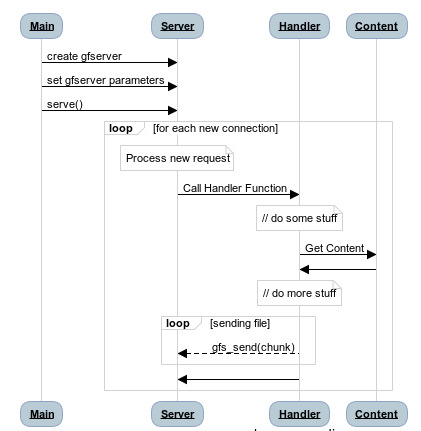
In main.c, create a thread pool using the external function worker_thread and call gfserver_serve to start the program.
After gfserver_serve receives the header, it retrieves and sends the requested path to the handler.
In the handler, package the requested path into the queue for processing by the worker threads.
Once a worker thread receives a task, it first checks for a matching local file:
file_not_found header.OK header along with the file content.After sending the file, the thread re-enters the loop. Since the server is always running, these threads will not terminate.
					void* worker_thread(void *arg) {
  while (1) {
    pthread_mutex_lock(&queue_mutex);
    while (steque_isempty(&work_queue)) {
      pthread_cond_wait(&queue_cond, &queue_mutex);
    }
    request_t *req = (request_t *)steque_pop(&work_queue);
    pthread_mutex_unlock(&queue_mutex);

    // get file path
    int fd = content_get(req->req_path);
    if (fd <= 0) {
        // Send header file_not_found
        printf("File not found: %s\n", req->req_path);
        if (gfs_sendheader(&(req->ctx), GF_FILE_NOT_FOUND, 0)<0){
            perror("sendnotfound:");
            free(req->req_path);
            free(req);
            continue;
        }
        return 0;
    }

    // Get file lens
    struct stat st;
    if (fstat(fd, &st) < 0) {
        perror("fstat");
        gfs_sendheader(&(req->ctx), GF_ERROR, 0);
        free(req->req_path);
        free(req);
        continue;
    }
    off_t file_len = st.st_size;

    // Send header OK
    if (gfs_sendheader(&(req->ctx), GF_OK, file_len) < 0) {
        perror("gfs_sendheader");
        //close(fd);
        free(req->req_path);
        free(req);
        continue;
    }

   // Send file content
    char buffer[BUFSIZE];
    ssize_t bytes_read;
    off_t offset = 0;
    while (offset < file_len) {
        ssize_t bytes_unread = file_len - offset;
        ssize_t bytes_to_read = (bytes_unread < BUFSIZE) ? bytes_unread : BUFSIZE;
        bytes_read = pread(fd, buffer, bytes_to_read, offset);
        if (bytes_read < 0) {
            perror("pread");
            break;
        }
        if (gfs_send(&(req->ctx), buffer, bytes_read) < 0) {
            perror("gfs_send");
            break;
        }
        offset += bytes_read;
    }
    // Free the request
    printf("In path %s Total bytes sent: %ld of len %ld\n", req->req_path,offset, file_len);

    free(req->req_path);
    req->ctx = NULL;
    free(req);
}

This is a Navigator for my CS Practice.
zixiongwan@gmail.com