Agile Development of Andorid App

Table of Contents

1. Introduction

This is a collaborative group project aimed at developing an Android app for comparing job offers when job hunting. It allows users to input various data from offers, such as salary, working hours, distance to the workplace, etc., and customize weight values to evaluate the quality of the job offers.

Gitbub Link

2. Environment

  • Android Studio (hedgehog): Android API 33
  • Java

3. Project Plan

3.1 Process Description

  1. Activity 1: Define Requirements and Create UML Diagrams

    • Activity Name: Define Requirements and Create UML Diagrams
    • Activity Description: Identify and document all functional and non-functional requirements for the app. Create UML diagrams to visualize the structure and interactions of the system components.
    • Entrance Criteria: Project specifications, initial meeting to discuss project goals and scope.
    • Exit Criteria: Complete set of requirements documentation and UML diagrams approved by all team members.
  2. Activity 2: Set Up Project Management Tools and Development Environment

    • Activity Name: Set Up Project Management Tools and Development Environment
    • Activity Description: Establish project management tools for task tracking and communication. Set up the development environment to ensure all team members can work efficiently.
    • Entrance Criteria: Requirements documentation and UML diagrams.
    • Exit Criteria: Project management tools (e.g. Slack) set up and operational. Development environment configured on all team members’ machines.
  3. Activity 3: Design Wireframes and Mockups

    • Activity Name: Design Wireframes and Mockups
    • Activity Description: Create visual representations of the user interface using wireframes and mockups. Ensure the design aligns with user requirements and provides an intuitive experience.
    • Entrance Criteria: Requirements documentation, UML diagrams.
    • Exit Criteria: Complete set of wireframes and mockups reviewed and approved by the team.
  4. Activity 4: Implement Main Menu and Navigation

    • Activity Name: Implement Main Menu and Navigation
    • Activity Description: Develop the main menu and navigation structure for the app, enabling users to access different features seamlessly.
    • Entrance Criteria: Approved wireframes and mockups.
    • Exit Criteria: Functional main menu and navigation, demonstrated through initial user testing.
  5. Activity 5: Develop Forms for Entering Job Details and Job Offers

    • Activity Name: Develop Forms for Entering Job Details and Job Offers
    • Activity Description: Create user interfaces for entering and editing current job details and job offers, ensuring data validation and user-friendly interactions.
    • Entrance Criteria: Approved wireframes and mockups.
    • Exit Criteria: Functional forms for entering job details and job offers, with validated inputs and smooth user interactions.
  6. Activity 6: Implement Data Models and Business Logic

    • Activity Name: Implement Data Models and Business Logic
    • Activity Description: Develop data models to represent job details and settings. Implement the business logic for comparison settings and job offer comparisons.
    • Entrance Criteria: Requirements documentation, UML diagrams.
    • Exit Criteria: Functional data models and business logic, demonstrated through unit tests.
  7. Activity 7: Integrate Front-end and Back-end Components

    • Activity Name: Integrate Front-end and Back-end Components
    • Activity Description: Combine the front-end user interfaces with back-end data models and logic to ensure a cohesive and functional app.
    • Entrance Criteria: Developed front-end interfaces, implemented back-end logic.
    • Exit Criteria: Integrated app with smooth interactions between front-end and back-end, validated through integration testing.
  8. Activity 8: Perform Unit Testing and Bug Fixing

    • Activity Name: Perform Unit Testing and Bug Fixing
    • Activity Description: Conduct unit tests on individual components to identify and fix bugs, ensuring each component functions correctly.
    • Entrance Criteria: Developed front-end and back-end components.
    • Exit Criteria: All unit tests passed, no critical bugs remaining.
  9. Activity 9: Conduct Usability Testing

    • Activity Name: Conduct Usability Testing
    • Activity Description: Test the app with real users to gather feedback on usability and identify areas for improvement.
    • Entrance Criteria: Integrated and unit-tested app.
    • Exit Criteria: Usability feedback collected, critical issues addressed.
  10. Activity 10: Make Final Adjustments

    • Activity Name: Make Final Adjustments
    • Activity Description: Implement changes based on usability feedback, optimize performance, and ensure a polished user experience.
    • Entrance Criteria: Usability testing feedback.
    • Exit Criteria: Final version of the app ready for use, with no critical issues remaining.

For the software lifecycle model, the team took a waterfall model approach since the user requirements are well defined and unlikely to change. We tackled the aforementioned activities in order, ensuring each exit criteria is successful and validated by other team members before moving onto the next one.

For code collaboration on the team repository, the team adopted the [Git feature branch workflow](Git Feature Branch Workflow _ Atlassian Git Tutorial), which allowed for prototyping flexibility and faster development.

To ensure code in the main branch is stable, we tag successful versions of the repository after each milestone, e.g. after submitting a deliverable.

3.2 Team

These are the main roles in the team:

RoleDescription
Project ManagerOversees project planning, scheduling, execution, and project submission.
App DeveloperResponsible for developing of the front-end UI and back-end logic of the app.
Database DeveloperResponsible for ensuring data persists between runs.
UI/UX DesignerDesigns the app’s interface and user experience.
Quality AssuranceEnsures the app meets user requirements and is bug-free.

The app development work was split by Acitivities and Models in the team. Above that, each member of the team took on an additional role to ensure project success.

Team MemberRoles
Tuck Weng PungProject Manager & App Developer
Christian DuqueDatabase Developer & App Developer
Viktoryia KalamiyetsUI/UX Designer & App Developer
Zixiong WanQuality Assurance & App Developer

4. UML Design

When the app is started, the user is presented with the main menu, which allows the user to (1) enter or edit current job details, (2) enter job offers, (3) adjust the comparison settings, or (4) compare job offers (disabled if no job offers were entered yet).

To fullfill this requirement, we created the JobOfferApp class which has:

  • mainMenu method to choose between the different actions
  • enterCurrentJobDetails method to enter current job details. The currentJob attribute is used to store the current job details.
  • enterJobOfferDetails method to enter job offers. The jobOffers attribute is a list of Job objects, enabling the storage of multiple job offers.
  • comparisonSettings attribute, which has default values of 1, and the adjustComparisonSettings method for adjusting weights.
  • comparison attribute and compareJobOffers method to compare and rank the jobs.

When choosing to enter current job details, a user will: a. Be shown a user interface to enter (if it is the first time) or edit all the details of their current job, which consists of: i. Title ii. Company iii. Location (entered as city and state) iv. Cost of living in the location (expressed as an index) v. Yearly salary vi. Yearly bonus vii. Training and Development Fund viii. Leave Time ix. Telework Days per Week

To fulfill this requirement, the method enterCurrentJobDetails will be invoked. We also created the Job class with the relevant attributes. Most details can be directly added as attributes of the Job class, with one exception. A Location has some attributes associated with it, namely its citystate, and cost of living. To reduce repetition of data if we were to store it as part of a Job attribute, we chose to model the Location as a separate class, and the Job has an associated Location.

Be able to either save the job details or cancel and exit without saving, returning in both cases to the main menu.

When the user presses the save button, a new Job instance will be created and set as the currentJob attribute of the JobOfferApp. If the user presses the cancel button, the new job instance will not be created. In both cases, the mainMenu method will be invoked.

When choosing to enter job offers, a user will: a. Be shown a user interface to enter all the details of the offer, which are the same ones listed above for the current job.

To realize this requirement, the method enterJobOfferDetails will be invoked. We use the same class Job as for the method enterCurrentJobDetails.

Be able to either save the job offer details or cancel.

When the user presses the save button, a new Job instance will be created and added to jobOffers list. If the user presses the cancel button, the new job instance will not be created. In both cases, the mainMenu method will be invoked.

Be able to (1) enter another offer, (2) return to the main menu, or (3) compare the offer (if they saved it) with the current job details (if present).

  • (1) For that purpose, the list of jobOffers was created in the JobOfferApp.
  • (2) The method mainMenu will be invoked and the user will be redirected to the main menu.
  • (3) To satisfy this requirement, the JobComparison class is presented.

When adjusting the comparison settings, the user can assign integer weights to: a. Yearly salary b. Yearly bonus c. Training and Development Fund d. Leave Time e. Telework Days per Week. If no weights are assigned, all factors are considered equal.

To fulfill this requirement, we created the ComparisonSettings class with the corresponding attributes with values equal to 1 by default. The JobOfferApp class includes an adjustComparisonSettings method for adjusting these weights.

When choosing to compare job offers, a user will: a) Be shown a list of job offers, displayed as Title and Company, ranked from best to worst (see below for details), and including the current job (if present), clearly indicated.

The JobOfferApp class includes a compareJobOffers method for this purpose. The JobComparison class contains the method getRankedJobs to display the ranked jobs.
To indicate which of these jobs is the current job, the JobOfferApp has a currentJob attribute. The computeScore method implements the formula for ranking job offers.

Select two jobs to compare and trigger the comparison. Be offered to perform another comparison or go back to the main menu.

Upon selecting two jobs to compare, the method compareJobs will be invoked, using selected jobs as parameters for this method. If the user chooses another comparison, the steps will be repeated. Otherwise, the method mainMenu will be called

When ranking jobs, a job’s score is computed as the weighted average of: AYS + AYB + TDF + (LT * AYS / 260) - ((260 - 52 * RWT) * (AYS / 260) / 8)) where: AYS = Yearly Salary Adjusted for cost of living AYB = Yearly Bonus Adjusted for cost of living TDF = Training and Development Fund ($0 to $18000 inclusive annually) LT = Leave Time (0-100 whole number days inclusive) RWT = Telework Days per Week

To realize this requirement the method computeScore in the class JobComparison is created. Reference
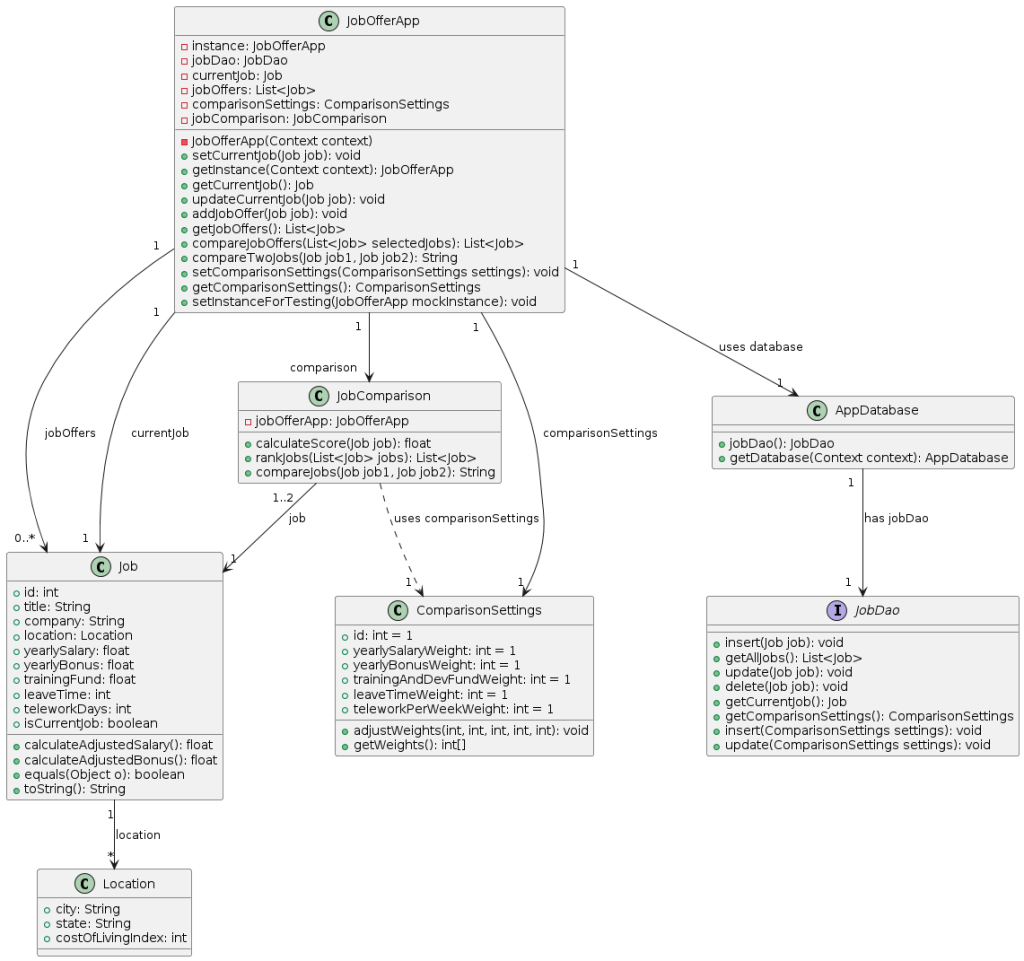
Final UML Diagram

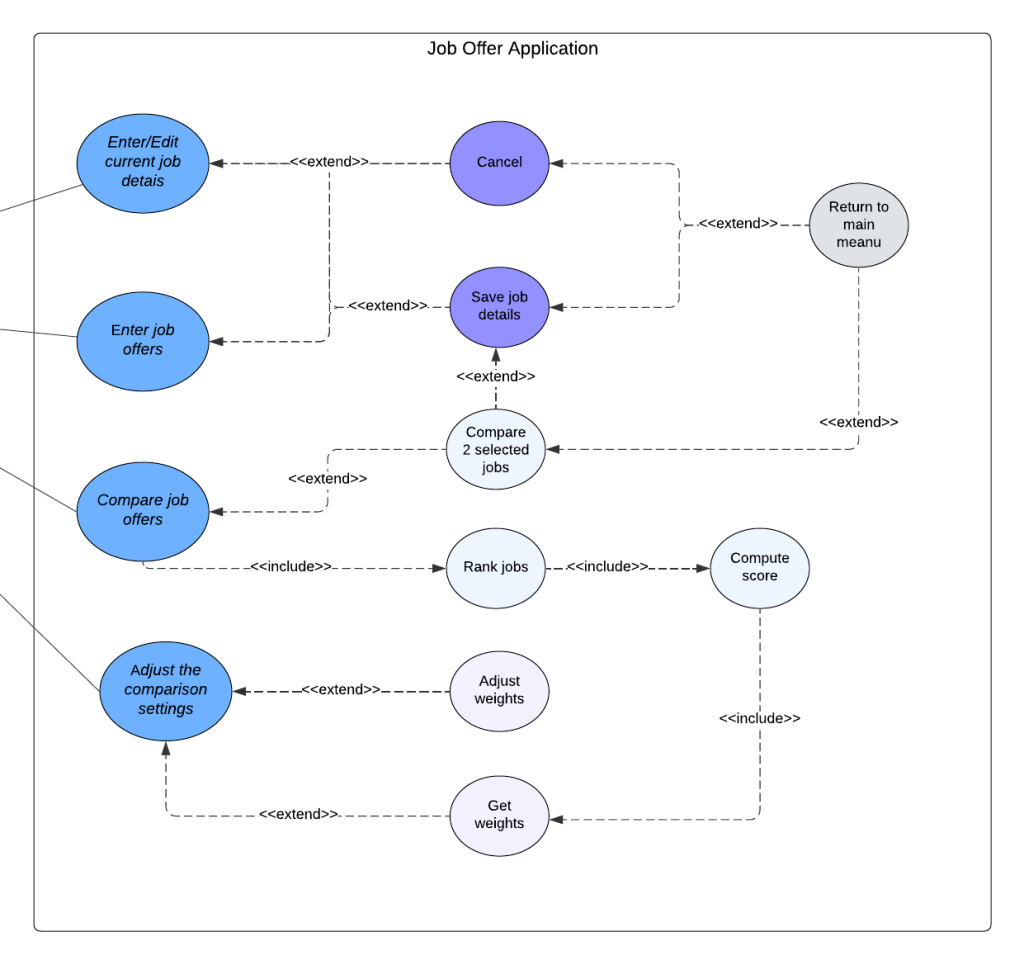
5. Use Case

Enter/Edit current job details
 
  • Requirements: The user should be able to either input their current job information or update it if it’s already present.
  • Pre-conditions: The user must have access to the application.
  • Post-conditions: The job is either saved or canceled, and the user is returned to the main menu.
  • Scenarios:
    • Normal Scenario
      • The user clicks Enter current job details button
      • Fills out the form
      • Clicks save button
      • The system saves the information and redirects the user to the main menu
    • Alternate Scenario
      • The user clicks Enter current job details button
      • Fills out the form
      • Skips the required field
      • Clicks save button
      • The system highlights missing required fields and prompts the user to complete them.
      • The user completes the required information.
      • Clicks the save button
      • The system saves the information and redirects the user to the main menu
    • Exceptional Scenario
      • The user clicks Enter current job details button
      • Fills out the form
      • Clicks the save button
      • The system encounters a server-side error and displays an error message to the user
      • The user exits the application and will try later
Enter job offers
  • Requirements: The user should be able to input their job offer information. The user should also be able to enter another offer, and compare the offer with the current job details (if present).
  • Pre-conditions: The user must have access to the application.
  • Post-conditions: The job offer is saved and added to the list of job offers, or canceled without saving. Upon clicking compare the user is shown a comparative table of the two selected jobs.
  • Scenarios:
    • Normal Scenario
      • The user clicks Enter job offers button
      • Fills out the form
      • Clicks save button
      • The system saves the information
      • The user is presented with buttons enter another offercompare the offer with the current job detailsreturn to main menu
      • The user clicks return to main menu
      • The system redirects the user to the main menu
    • Alternate Scenario
      • The user clicks Enter job offers button
      • Fills out the form
      • Clicks save button
      • The system saves the information
      • The user is presented with buttons enter another offercompare the offer with the current job detailsreturn to main menu
      • The user clicks enter another offer
      • The sequence of events repeats
      • After saving another job offer, the user clicks return to main menu
      • The system redirects the user to the main menu
    • Exceptional Scenario
      • The user clicks Enter job offers button
      • Fills out the form
      • Clicks the save button
      • The system encounters a server-side error and displays an error message to the user.
      • The user exits the application and will try later
Compare job
  • Requirements: The system should display a list of job offers, ranked from best to worst and including the current job clearly indicated.
  • Pre-conditions: The user must have at least two jobs for the comparison
  • Post-conditions: A table is presented, displaying a comparison of the two jobs
  • Scenarios:
    • Normal Scenario
      • The user selects two jobs from a list to compare
      • Clicks compare button
      • The system shows the user a table that compares the details of the two selected jobs
      • The system presents the user with the option to either make another job comparison or return to the main menu
      • The user clicks return to main menu
      • The system redirects the user to the main menu
    • Alternate Scenario
      • The user selects two jobs from a list to compare
      • Clicks compare button
      • The system shows the user a table that compares the details of the two selected jobs
      • The system presents the user with the option to either make another job comparison or return to the main menu
      • The user clicks make another comparison
      • The sequence of events repeats
      • After making another comparison, the user clicks return to main menu
      • The system redirects the user to the main menu
    • Exceptional Scenario
      • The user selects two jobs from a list to compare
      • Clicks compare button
      • The comparison request can’t be completed because of the internet connection issues
      • The system displays the message “Please check your connection and try again”
      • The user exits the application and will try later
Adjust the comparison settings
  • Requirements: The system should provide the user with an option to adjust their comparison settings.
  • Pre-conditions: The user must have access to the application.
  • Post-conditions: Comparison settings updated.
  • Scenarios:
    • Normal Scenario
      • The user clicks adjust comparison settings
      • The user assigns integer weights to the chosen fields
      • The system saves the information and redirect the user to the main menu
    • Alternate Scenario
      • The user clicks adjust comparison settings
      • The user assigns string instead of integer weights to the chosen fields
      • The system displays the error message about invalid data type
      • The user assigns integer weights to the chosen fields
      • The system saves the information and redirect the user to the main menu
    • Exceptional Scenario
      • The user clicks adjust comparison settings
      • The user assigns integer weights to the chosen fields
      • The system encounters the unexpected error while saving the information
      • The user exits the application and will try later
User model

6. Test Plan

Overall strategy


The testing strategy for the Job Offer Comparison application will include unit testing, integration testing, system testing, and regression testing. The testing activities will be performed as follows: Unit Testing: Conducted by developers who is responsible for building this part, to test methods in each individual component

  • compareJob , getRankedjobs()computeScorein class JobComparison
  • adjustWeights()getWeight()in class ComparisonSettings
  • Mainmenu(),enterCurrentjobDetails()enterjobOfferDetails()adjustCompaisonSettings()comparejobOffers() in Class jobOfferApp

Integration Testing: Conducted by the whole team to ensure that different components/modules work together as expected

  • Integration of JobOfferApp and Job:
    • Verify that JobOfferApp can correctly assign a Job to with currentJob.
    • Verify that JobOfferApp can correctly add multiple Job objects to jobOffers
  • Integration of JobOfferApp and ComparisonSettings
    • Verify that JobOfferApp can correctly assign ComparisonSettings.
  • Integration of JobOfferApp and JobComparison
    • Verify that JobOfferApp can correctly initiate a JobComparison
  • Integration of Job and Location
    • Verify that a Job object can correctly associate with a Location object.
  • Integration of JobComparison and Job
    • Verify that JobComparison can correctly accept two Job objects and compare them.
  • Integration of JobComparison and ComparisonSettings
    • Verify that JobComparison correctly uses ComparisonSettings to adjust comparison weights.

System Testing: Conducted by the whole team to validate the end-to-end functionality of the application against the requirements to see if the the various features work.

  • Verify that the application starts correctly and displays the main menu.
  • Verify that the user can enter and save current job details.
  • Verify that the user can cancel entering current job details.
  • Verify that the user can enter and save job offers.
  • Verify that the user can cancel entering job offers.
  • Verify that the user can adjust and save comparison settings.
  • Verify that the user can cancel adjusting comparison settings.
  • Verify that the user can compare job offers
  • Verify that job offers are ranked correctly based on the comparison settings.
  • Verify that a comparison between the current job and a job offer is accurate.

Regression Testing: Conducted by whole team to ensure that new code changes do not adversely affect the existing functionality of the application. To make this test, select a subset of test cases from unit, integration, and system testing that cover critical functionalities and areas affected by recent changes. Automate the execution of selected test cases using testing tools to ensure quick and consistent validation.

Test Selection


Test cases will be selected using a combination of black-box and white-box testing technique.

Black-box Testing: Focuses on the functionality of the application without considering the internal code structure. This will be used primarily for system testing. In our project, we use a Category Partition Method:

  • Identify Independently Testable Features:
  • Identify Categories
  • Partition Categories into Choices
  • Identify Constraints Among Choices
  • Produce/Evaluate Test Case Specifications

White-box Testing: Focuses on the internal logic and structure of the code. This will be used for unit testing and integration testing to ensure all paths and branches are tested. Use Control-flow based testing shown in P4L3 involves creating test cases to cover different paths in the code, including all branches and conditions.

Adequacy Criterion


Adequacy criteria are metrics used to evaluate the completeness and effectiveness of the test cases in covering the functionality and structure of the application.

  • For black box testing
    • Functional Coverage: Measure the percentage of functional requirements tested. The test covered all systemic functional tests, with a coverage rate of 100 percent.
  • For white box testing
    • Statement Coverage: Measure the percentage of executed statements. Ensure that each statement in the code is executed at least once by the test cases.The unit tests cover all statements for activity classes.
    • Branch Coverage: Measure the percentage of executed branches. Ensure that each branch (decision point) in the code is executed at least once. The test covers most of the branches, with an approximate coverage rate of 90 percent.
    • Path Coverage: Measure the percentage of executed paths. Ensure that all possible paths through the code are executed.The test covered majority of the path, with an approximate coverage rate of 70 percent.
Bug Tracking


Bugs and enhancement requests were tracked using a bug tracking system (e.g., JIRA). Each bug was logged with details such as steps to reproduce, severity, priority, and assigned developer. The status of each bug are updated as it progresses through different stages.

Technology


The following testing technologies are used:

  • JUnit: For unit testing of individual components, ensuring individual components work in isolation.
  • Selenium: For automated UI testing.
  • TestNG: For managing test cases and generating reports.
  • JIRA: For bug and issue tracking.
  • Robolectric: For running Android unit tests on the JVM, allowing to test Android components without an emulator or device.

See in the github for test result